
I do not consider myself a programmer. I never really have.
Over the years I have picked up a wide range of languages and technologies: Python, Ruby, JavaScript, C and C++, a little assembly at university, HTML and CSS, shell scripting, a handful of databases and web frameworks. I understand how modern applications are glued together, from REST APIs to webhooks to event-driven architectures, and I can read and write code across a lot of contexts. But I am a maker first. My interests are wide, and that breadth keeps me from going deep on any single thing for long. Electronics, PCB design, embedded systems, education, content. Programming is one tool in a large workshop, not the whole shop.
For most of my life as a Maker, engineer, and educator, that breadth came loaded with a dose of frustration that I suspect you can recognise: my ideas ran faster than my ability to build them. Often, I have a vision for an application I want to build. I know what it should do, how it should behave, what problem it would solve. But getting from that vision to a working software application was always the slow and frustrating part of the process. I would commit to weeks of wrestling with software development frameworks I half-knew, debugging logic I had half-forgotten, fighting the friction of each language's particular ecosystem. I learned to be patient. Furthermore, I learned to scope my ideas down to what I could realistically build alone, within a reasonable amount of time. The limitations attached to this approach were serious, and they were crippling to my ability to complete my most ambitious projects. Across my whole career I have shipped maybe three or four pieces of software I would call finished. The rest stalled at the prototype stage, or never left my head.
Why I wrote this book
That changed, and it changed sharply rather than gradually, once I started using AI coding assistants seriously rather than experimentally. What changed was not that I became a better programmer overnight but that the gap between idea and working prototype literally collapsed.
I can now take a software-shaped idea and have a prototype running in hours. Not simply a wireframed sketch, but a working prototype I can interact with and improve. Given a bit of clear specification and a little more patience, I can now build things I am happy to put in front of other people. Things I complete.
Once I understood how to harness the power of AI coding assistants, I started applying this understanding outside of Maker projects. I have built tools that prepare briefings before a meeting, systems that pull usable knowledge out of years of old course material, and small applications that plan long drives for fuel efficiency. I am a licensed pilot, and even my flight preparation has changed: I have co-written tools that collect, decipher and present in a graphical way forecasts, NOTAMs, and flight plans. None of these are Maker projects in the traditional sense. They span my professional work, my hobbies, and the running of my business. The common thread is that each one was a software-shaped problem, and the implementation bandwidth that used to stop me no longer does.
The best way I have to describe the feeling that stems from the ability to delegate most of the programming to AI coders is that my creation capability ceiling has lifted. What I can create is now limited by my imagination and my ability to describe what I want, not by my fluency in any particular programming language or framework. And the ceiling keeps rising, because what is hard for an AI tool to write this month is often routine for next month's.
I can think of only one other technology that has had this kind of broad, cross-domain effect on my life, and that is the Internet. That is not a casual comparison. As the Web evolved, I transformed the way I learned, worked, communicated, and ran a business. AI coding tools are doing the same thing, touching every part of my working and hobbyist life at once rather than improving one corner of it. That is an extraordinary thing to be able to say, and it is why I wrote this book.
Power and risk scale together
There is a catch, and it is the reason this book is as much about human judgment as it is about tools.
As I handed more of my work to AI, I noticed that the power and the risk scaled together. When you ask for a single function and check it, the worst case outcome is a function that does not quite do what you wanted; you'll, hopefully, catch it in review, fix it, and continue; no harm done. When you hand over a larger piece of a system, the AI tool can produce code that runs, passes its tests, but is still subtly wrong in a way that only surfaces under conditions you did not think to check. Or it does exactly what you asked, and what you asked turns out to be the wrong thing. Because you handed over so much at once, the bug, whether small or large, may not surface until much later.
While we are on the topic of things that can go wrong, it's worth going into this a little deeper. Early on, I asked an assistant to add a moving average to a temperature-logging script. It ran, the plot looked smoother, and I moved on; only weeks later did I notice that every session opened with its readings dragged toward zero, because the model had quietly filled the averaging buffer with zeros rather than waiting for real samples. Nothing crashed, and no test failed. That is the shape of the problem, and the wrongness comes in several categories. Some are logic errors: a calculation that looks right but uses the wrong formula, an array index that is off by one because the model inferred the convention from code it had seen rather than from what you told it, a boundary condition that works for the inputs you tested and fails silently for the ones you did not. These can be found with careful testing, if you write tests that are careful enough.
Some are subtler. Security vulnerabilities in AI-generated code are often introduced not by carelessness but by pattern. The model has seen thousands of examples where user input is concatenated directly into a database query, or passed to a shell command, or stored with weaker protection than current best practice requires. It generates what it has seen. It doesn't know your threat model, only the code you put in front of it. The result can be code that passes every functional test you wrote, ships into production, and contains a vulnerability that nobody planted deliberately, and nobody went looking for either.
Then there is the opacity problem. When you write code yourself, you carry a mental model of every decision in it, including the ones you made badly. When an AI writes a large block of it, anything you didn't actively read and understand becomes a blind spot. Your review is only as thorough as your mental model, and with generated code that model is always incomplete in places you cannot easily see.
The more you delegate to the AI coding agent, the more precisely you have to think before you delegate. The bottleneck moves from "can I write this code?" to "can I describe what this code should do clearly enough that a machine, or another person, could build it correctly?" That is a completely different skill, and most of us have never had to develop it, because we were the ones writing the code. In everyday work we rarely have to spell things out in fine detail, because close-knit teams share so much context. We leave a great deal unsaid and trust the other person to fill in what we mean.
There is a second risk, slower to appear and harder to notice. As the AI produces good results consistently, the natural response is to trust it more and check it less. That is not an irrational process; it is how trust works among humans. But scrutinising code is a skill, and skills weaken without exercise. The developer who stopped reading generated output carefully several months ago is less equipped to catch the subtle error today. This creates a compounding dynamic: as the AI becomes more capable, humans get less practice at precisely the skills they would need to catch the AI being wrong. I am acutely aware of this risk, and this book is written on the assumption that you are too. I assume you are willing to remain conscious of how much you are delegating, and of what core skills you might be losing by doing it. But I want to name and shout-out this risk plainly rather than assume it away, because the pull toward comfortable trust is real, and it does not feel like a loss until something goes wrong. As the old saying goes, "if you don't use it, you lose it."
This book is built around that shift. There is a spectrum of how much you hand over, from asking a quick question to turning an autonomous agent loose on your files. Chapter 2 lays out the five levels of delegation this book uses, centred on the size of the task you hand across. The rest of the book is about working well at each level: when to trust the output, when to verify it carefully, and when to keep your own hands on the work.
What you will build
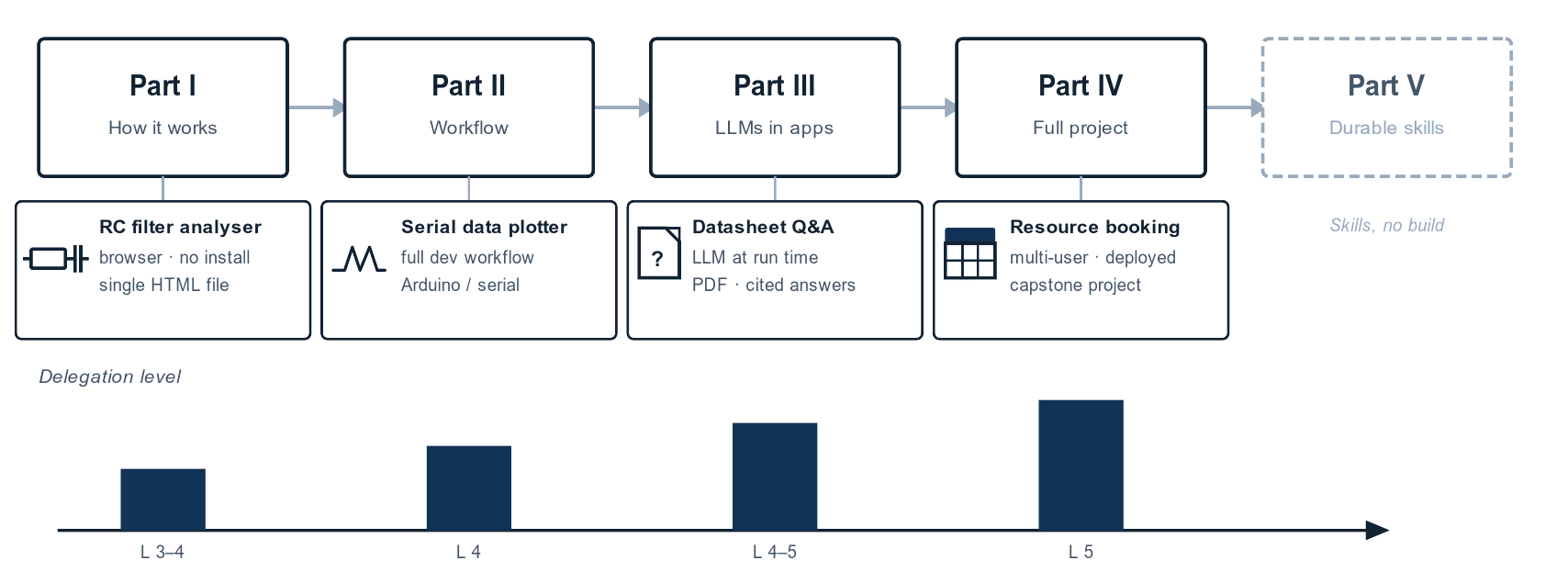
This is a book you build along with, not just read. Each part ends with a real tool, something you could use, not a tutorial exercise with the interesting parts removed.
A calculator in a browser (Part I). Your first build is an interactive analyser for a first-order RC filter. You enter resistance and capacitance, and it plots the frequency response and marks the cut-off. It is a single self-contained HTML file, built with nothing more than a chat-based AI assistant in your browser: no editor, no terminal, no installation. The point is not the tool itself but the experience of framing a request precisely enough that the output is useful. That is the skill everything else builds on.
A serial data plotter (Part II). Point it at an Arduino or any microcontroller sending values over a serial connection, and it plots several variables live. This is where you see and experience the full development workflow end to end: brainstorm, specify, build, test, refine, document, and ship, working in a properly configured editor with an AI coding assistant.
A datasheet question-and-answer tool (Part III). You give it a PDF datasheet, the kind you have downloaded a hundred times and skimmed looking for one pin description or one timing figure, and you ask it questions and get cited answers back. This is the first build where a language model runs inside the finished tool at run time, not just in your workflow. It demonstrates retrieval-augmented generation (RAG), a pattern that is immediately practical for anyone who has lost twenty minutes inside a hundred-page datasheet.
A resource booking system (Part IV, the capstone). A complete multi-user application that lets a group share and book equipment or facilities. You build it across the whole of Part IV, moving through every stage from idea to deployed software, and you meet the concerns that separate a personal script from an application other people rely on: multiple users, a database, external services, background work, and multi-tenancy (where one application serves multiple independent groups of users).
Part V steps back from building to the durable skills, the parts of this craft that will still matter when today's tools have been replaced.
What you will need
The list is short, and none of it is expensive.
- A computer. Windows, Mac, or Linux all work. Nothing powerful: if it runs a browser and a code editor, it is enough.
- A code editor. Free, cross-platform, and used throughout the hands-on chapters. If you strongly prefer a different editor, the ideas transfer, though the walkthroughs assume one specific editor.
- An AI coding assistant. This is the tool that sits between you and the model, reading your files and applying changes. Part II introduces the options and gets you set up. You do not need to install anything to start reading.
- Access to a large language model. The assistant connects to a model, either through a cloud service or running locally on your machine. You can complete every build in this book without expensive model access.
- An internet connection for cloud models. Local models do not even need that, though a reasonably capable machine helps.
No specialised hardware. No paid licences before you have decided this is for you.
In practice (current as of July 2026). The specific editor, assistants, and models I use, along with current pricing and a rough cost for a full run through the book, change every few months. As I write this, that means VS Code as the editor, an assistant such as Cline or Claude Code, and a model from the Anthropic Claude family, but treat those as examples rather than requirements. I keep an up-to-date list, with install links, at txplo.re/ai_resources. The principles in this book do not depend on any of those specifics, so the running text names categories of tool rather than particular products. The Toolscape interlude before Part II and the appendices at the back collect the current names in one place, each dated.
What you will not need
It is worth being just as clear about what is not required.
- You do not need to be a programmer. Some background helps you judge what the AI produces, but it is not a gate. People with no formal programming experience are building real software with these tools right now.
- You do not need fluency in any particular language. The builds use Python and JavaScript because they are practical choices for the tools involved. You will develop the ability to read and guide code as you go; that is built into the workflow.
- You do not need prior experience with AI tools. This book starts at the beginning.
- You do not need expensive hardware or subscriptions. Every build can be completed with affordable model access.
What you do need is a tolerance for ambiguity. AI-assisted development is not a deterministic process. You will get outputs that are incomplete or wrong, you will iterate, and now and then you will throw something away and start again. The workflow this book teaches is built around that reality rather than pretending it does not exist.
How this book is organised
The book is in five parts. Part I covers how AI-assisted coding works: the mental model, the five levels of delegation, how to frame a problem, and how to catch the ways it goes wrong. Part II is the development workflow, stage by stage, with the serial data plotter as the worked example. Part III is about applications that use a language model at run time. Part IV is the capstone, a full application built from nothing. Part V is the durable skills.
Some material in this field goes stale quickly: model names, tool versions, prices, install steps. I have quarantined all of it. The short Toolscape interlude before Part II, and Appendices A and B at the back, are the only places where you will find specific products and numbers, and each carries a date and a pointer to txplo.re/ai_resources for the current version. The main chapters are written so that a reader who ignores every dated box still understands every principle. If you are reading this a year after it was printed, the chapters still hold; check the resources page for the current tool set.
If you are new to all of this, read the parts in order. Each one assumes the one before it. If you already work with AI coding tools and want the workflow, you can move quickly through Part I and slow down at Part II.
There is also a companion to this book. If you are someone who likes to see a thing done, take it in, and then do it yourself, I have recorded a full video course that follows the same builds you will find in these pages. Where the book explains each build and walks you through the key steps, the videos capture every detail of the work: each prompt I write, each response the AI agent sends back, the dead ends, the corrections, and the small decisions that rarely fit onto a printed page. It is the closest thing to sitting beside me while I develop these applications. If you want finer granularity on the practical chapters, or you simply learn better by watching before you build, that is what the course is for. You will find it, with current links and details, at txplo.re/ai_course.
About the code in this book
Throughout this book you will encounter Python code. It comes from my own builds of the projects in this book, including intermediate iterations and fragments chosen to make a specific point. Much of it is exactly what an AI coding assistant produced, lightly edited or explained in the surrounding text. If you are not fluent in Python, that not a problem. These examples are not exercises for you to type out and memorise. They are here to show you what the output of AI-assisted development looks like, so that you can recognise it, read it, and form a judgement about whether it does what you asked.
One of the core responsibilities you carry as the human in this workflow is reviewing what the agent produces before you run it or hand it to someone else. You don't need to be able to write the code yourself to do that review, but you do need to spend enough time with it to understand what it is doing. If a block of code is unclear to you, a practical technique is to open a separate chat session with any capable language model, paste the code in, and ask it to explain what each part does. This serves two purposes at once: it builds your own understanding, making you a better reviewer over time, and it gives you a second perspective on the agent's output, one that may catch something the first agent got wrong. Using one AI to check the work of another is not a sign of being sloppy or lazy; it is a technique I use myself, particularly when the code is complex or a function's correctness is critical.
Let's turn to Chapter 1, where we look at what AI-assisted coding is, and, just as importantly, what it is not.